插件名:wp flash img show
插件URI:http://xwjie.com/post/wp-flash-img-show.html
插件作者:Tojary
最新版本: v1.4
作者主页:http://xwjie.com
描述:wp flash img show是一个flash图片幻灯片轮换wordpress插件,你可以利用它展示热门日志、艺术图片、商品、产品。通过改变用户设置,还可以用来做图片广告、宣传标语等等。请发挥创意。
演示:http://xwjie.com/demo/wp-flash-img-show-demo.php
下载:http://wordpress.org/extend/plugins/wp-flash-img-show/
安装方法(简体中文)
步骤1. 下载解压 wp-flash-img-show.zip(如果是在Wordpress后台“添加插件”处安装,跳过步骤1和2)
步骤2. 上传 wp-flash-img-show 文件夹到你的网站 /wp-content/plugins/ 目录内
步骤3. 用管理员身份登录,在“插件”选项内激活 “WP flash img show” 插件
步骤4. 在 ‘设置’ — ‘WP flash img show’ 设置图片地址和显示参数,这时候通过预览你可以看到效果
步骤5.(这里可以分2中添加方式,一种是HTML:方便而且那里都可以加,另一种是PHP代码:效果一样,也许加载会快一点。从v1.3版本开始,你可以直接在后台“WP flash img show”设置页面的预览下面找到并点击“获取代码”直接复制可用,可以免去自己改下面两种代码的麻烦了)
方法1: 把这句HTML代码复制到你的主题文件/文章/边栏小工具(文本小工具): <div id="wp_flash_img_show_here">wp_flash_img_show will diaplay here</div> , 用这样的代码显示你的自定义配置(替换 COMFIGNAME):<div id="wp_flash_img_show_here_COMFIGNAME">wp_flash_img_show will diaplay here</div>
方法2: 把这句PHP代码复制到你的主题文件中: <?php if (function_exists('wp_flash_img_show')) {wp_flash_img_show();} ?> 用这样的代码显示你的自定义配置(替换 COMFIGNAME): <?php if (function_exists('wp_flash_img_show')) {wp_flash_img_show('COMFIGNAME');} ?>
这里还有一些关于如何使用代码的例子(点击显示大图):
注意:要使插件正常运行确保你的主题模板文件中有一个 wp_head() 在 </head> 之前, 而且有一个 wp_footer() 在 </body> 标签之前(wp_footer()函数仅会影响使用HTML代码的情况), 否则很多插件无法使用,包括本插件(请手动添加到主题模板文件中).点击上面相应的链接有官方的说明以及自己添加这个标签到主题文件的教程。
重要说明
因为v1.3的某个svn的版本出现了一个停用插件时备份图片文件出错的缺陷,可能导致无法正常卸载、停用本插件的问题,这时候你只需要登陆网站管理后台的文件管理,或者用FTP工具管理文件,把网站的 “wp-content/plugins/wp_flash_img_show/” 整个文件夹删除掉,重新安装就可以解决这个问题。
也有另外一种解决这个问题的方法:点击插件下的“编辑”,此时应该有提示在编辑文件“wp-flash-img-show/wp-flash-img-show.php” , 全选内容然后粘贴一下代码,就可以停用、卸载插件了,对您造成的不便表示歉意。
<?php

/*

Plugin Name: WP flash img show

Plugin URI: http://xwjie.com/post/wp-flash-img-show.html

Version: 0.1

Author: Tojary

Author URI: http://xwjie.com

Description: wp-flash-img-show

*/

?>
另外,如果发现后台有提示本插件有 “ Headers already sent… ” 这样的错误的话 ,你可以在插件管理页面编辑本插件的“wp-flash-img-show/wp-flash-img-show.php”文件,把最后的一个“?>”之后的换行符删除掉。
关于版权:
1. 本插件在 GPL. 协议下发布,关于该协议的相信内容请查看插件压缩包内的 license.txt 文件。
2. 本插件使用的FLASH播放器(.swf) 是 ‘bcastr flash image player’,作者: zhangruochi
该项目主页 http://code.google.com/p/bcastr/ 发布于 Apache License 2.0 协议
最后提醒:如果旧版本已经运行良好,满足你的需求的话,不要尝试更新到最新版,可能这样会让你浪费不少时间去重新设置,而且WP的后台一键更新会导致放在插件文件夹内的所有内容被删除(当然也包括image文件夹下的图片。)
截图:
点击这里查看: //xwjie.com/file/wp_flash_img_show_screenshot_v1.3.png
plugin name: wp flash img show
Plugin URI: http://xwjie.com/post/wp-flash-img-show.html
Author: Tojary
latest version: v1.4
Author home page: http://xwjie.com
wp flash img show is a FLASH Image Slide plugin for WordPress.You can show your articles , photo,goods,product and other ad. or introduction .
The Options include:Round Corner,Auto Play Time,Is Height Quality,Window Open,Button Margin,Button Distance,Description Bg Color,Description Bg Alpha,Description Text Color,Description Text Font,Description Move Duration,Button Alpha,Button Text Color,Button Default Color,Button Hover Color,Button Focus Color,Chang Image Mode,Is Show button,Is Show Description,Scale Mode,Transform Mode.There are 4 scale mode(No Border/Show All/Exact Filte/No Scale) and 8 transform mode (alpha/blur/left/right/top/bottom/breathe/breathe+Blur). Just enjoy it.
Demo:http://xwjie.com/demo/wp-flash-img-show-demo.php
Download :http://wordpress.org/extend/plugins/wp-flash-img-show/
Installation
step 1: Extract wp-flash-img-show.zip
step 2: Upload wp-flash-img-show folder to the /wp-content/plugins/ directory
step 3: Activate ‘wp flash img show’ in your Admin Panel (‘Plugins’ menu )
step 4: Change the Settings and you will see the Preview.
step 5: Click Get code link which under the Preview , there are two method (PHP Code/HTML Chde) to make this plugin work for you.
Method 1: Put this HTML code in your Template / Post / Widgets(text-widgets). <div id="wp_flash_img_show_here">wp_flash_img_show will diaplay here</div> , to display your new custom config (Replace CONFIGNAME): <div id="wp_flash_img_show_here_CONFIGNAME">wp_flash_img_show will diaplay here</div>
Method 2: Put this PHP code in your template: <?php if (function_exists('wp_flash_img_show')) {wp_flash_img_show();} ?> , to display your new custom config (Replace CONFIGNAME): <?php if (function_exists('wp_flash_img_show')) {wp_flash_img_show('CONFIGNAME');} ?>
here is some example:
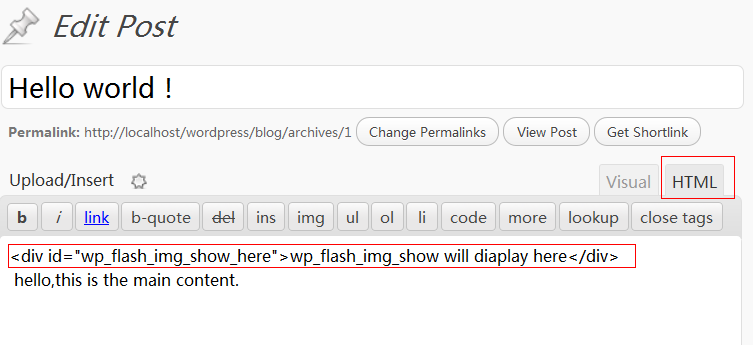 Insert to a Post |
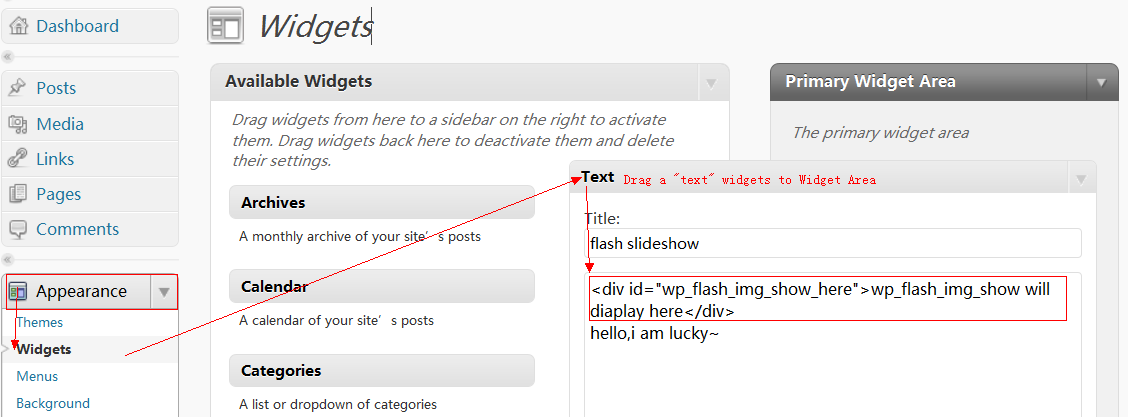 Insert to Sidebar |
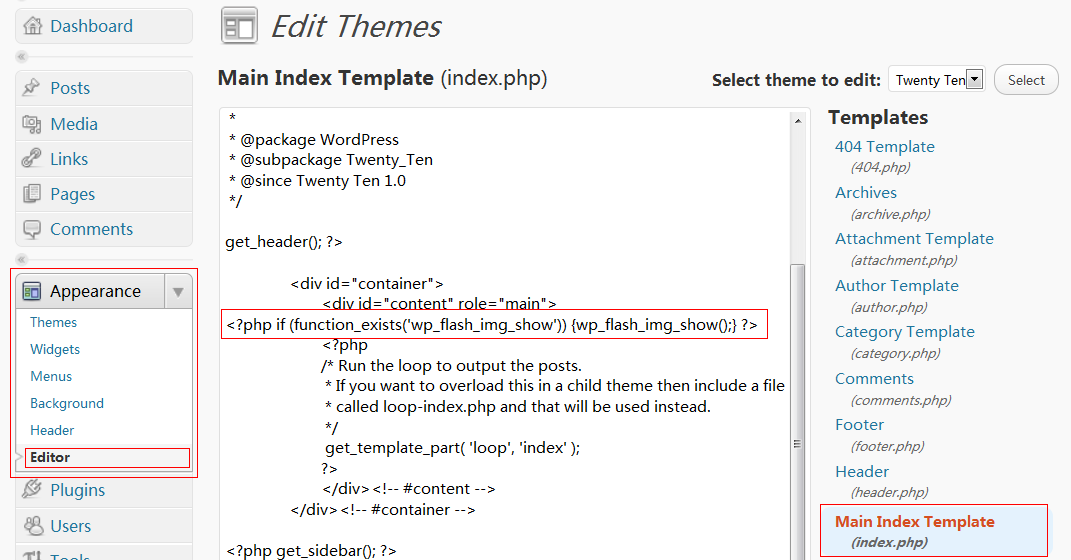 Insert to index.php |
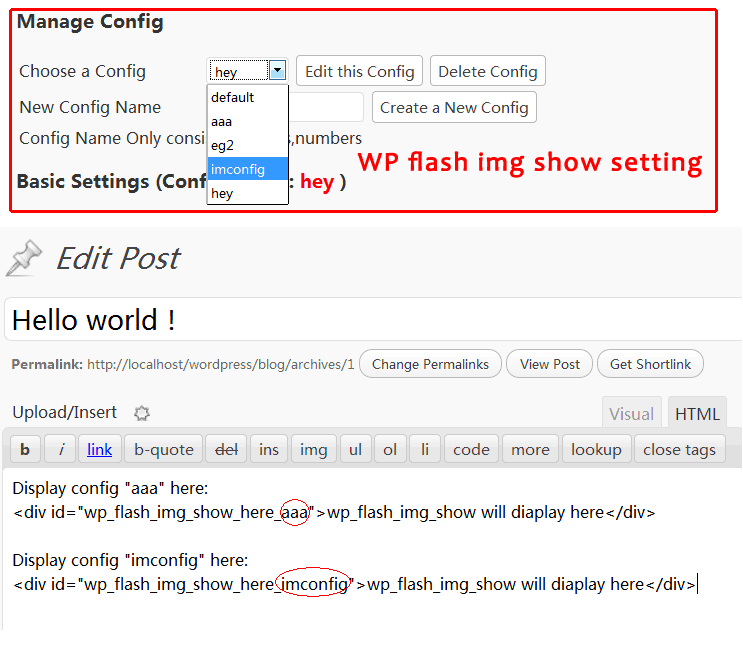 Insert to a Post |
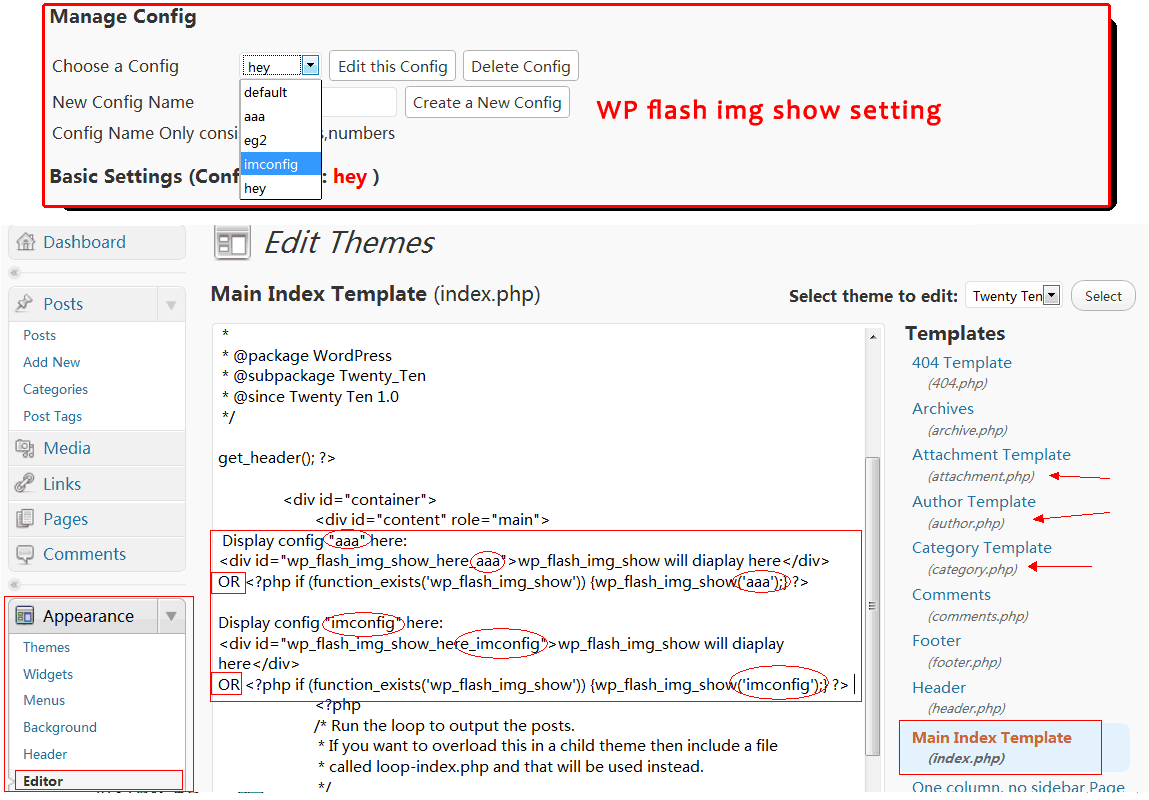 Insert to index.php |
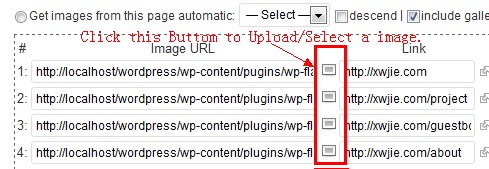 How to Upload images |
Notice: Make sure have wp_head() just before the closing </head> tag of your theme AND have wp_footer() just before the closing </body> tag of your theme, or you will break many plugins.(You can edit and add those function to your theme file. Click the link of that two tags link will help you solve the problem)
Translations:
The plugin comes with various translations, You can submit your translations here or Email to xwjie.com@gmail.com
Translator:
Chinese(简体中文)(zh_CN): Xwjie
Vietnam(Tiếng Việt)(vi_VN): Minh Lâm
Turkish(tr_TR): Weeebdesign
Notice:
NEVER try to update this plugin to the latest version if it work well for you now. It will delete all of the images under “wp-content/plugins/wp_flash_img_show/images/” through the automatic update of WORDPRESS,and it may take you some time to change the setting again.
If you can not update/stop/remove this plugin , you neet to Delete folder “wp-content/plugins/wp_flash_img_show/”,refresh the wp-admin page,And then reinstall WP flash img show.
An other way is Go to the plugin editor. Select WP flash img show from the dropdown. Edit the file wp-flash-img-show/wp-flash-img-show.php , Select all -> paste this code and save. And then reinstall WP flash img show
<?php

/*

Plugin Name: WP flash img show

Plugin URI: http://xwjie.com/post/wp-flash-img-show.html

Version: 0.1

Author: Tojary

Author URI: http://xwjie.com

Description: wp-flash-img-show

*/

?>
if it display warning “Headers already sent… ” ,Click Here: http://wordpress.org/support/topic/plugin-wp-flash-img-show-headers-already-sent?replies=3
Copyright
1. This Plugin Released under GPL. For More:license.txt
2. The Flash Player(.swf) is base on ‘bcastr flash image player’,Author: zhangruochi
http://code.google.com/p/bcastr/ Released under Apache License 2.0
screenshot
Click: //xwjie.com/file/wp_flash_img_show_screenshot_v1.3.png
你好,插件写的很丰富,
如果我想把“描述的背景”移到底部,而不是默认的顶部时,应该如何解决?
@Kaixa:
你好,即将推出的新版将会为每个配置的“描述”提供“顶部或者底部”的选项。
现在你可以暂时先点击这里:
http://file.xwjie.com/wp-flash-img-show.swftitle-at-bottom.zip
下载这个SWF文件覆盖原来的SWF(全部配置都是“描述”在底部)。
Hey I’m trying to use this plugin on a SSL SECURE page, how can i get it to display https…?
Right now it is the only element on the page which is ‘insecure’, how can i change it to secure?
@Flavored Condoms:
I’m sorry that i don’t have any server with SSL, so i can’t test and find where the problem is.
Hello, Thank you for your perfect plugin
before the slide starting, there is a small message at the top right that say something like
“flash player 9 is required” for 1 seconed.
how can i remove that message ?
@isimple:
Open and edit this file:
wp-flash-img-show.php,searches for
This movie requires Flash Player 9(at line 927, or line 730) and then delete it.Hello, thank you so much für you perfekt plugin.
Ich runs with html code on my website. But the pictures are out of focus.
I couused with the button: “Get images from this page automatic”
Can you help me?
@jo:
I am not sure the exact meaning of
But the pictures are out of focus.You means that the pictures is unclear(shadowy) ? You can Change the
Scale Modesetting and fix it.Warning: DOMDocument::save(/home/lhxp/domains/52il.com/public_html/wp-content/plugins/wp-flash-img-show/wp-flash-img-show.xml) [domdocument.save]: failed to open stream: Permission denied in /home/lhxp/domains/52il.com/public_html/wp-content/plugins/wp-flash-img-show/wp-flash-img-show.php on line 1019
WP flash img show Setting
Settings saved . Enjoy it !
是怎么回事
可以告诉我一下吗
@52il:
文件夹写权限的问题,请修改你服务器的
/public_html/wp-content/plugins/wp-flash-img-show/文件夹的权限为“可写”(可以通过FTP修改,详情请参考: http://codex.wordpress.org/zh-cn:%E6%9B%B4%E6%94%B9%E6%96%87%E4%BB%B6%E6%9D%83%E9%99%90 )谢谢解决了
With the same configurations, the show slide works on localhost but does not work on web server. How to fix the problem? Please advise. Thanks.
@:
I think the
Image URLis incorrect. (Can NOT begin withhttp://localhostorhttp://127.0.0.1on your web server.)Hi xwjie:
Having said so, how can I correct the Image URL and make it begin with http://localhost or http://127.0.0.1 on my web server?
@:
Update
Image URLinput fieldt in the Setting panel.Example:
http://file.xwjie.com/20111010185708-setting.png
Hi Xwijie:
The problem is that even I can see the preview slide show at my wordpress back-end system. How should I do so that I can see the preview slide from my wordpress back-end system? I can see the preview slide show on my localhost that means on my notebook. But I can see the preview slide show on my web server after I installed wp-flash-img-show. Please help. Thanks a lot.
@:
I am sorry for my poor English, would you mind send the URL of your website and some screenshots of wp-flash-img-show Setting panel ?
Hi!
Fisrt, I’d like to tell you that you plugin is perfect! I tried many other but they didn’t work! ‘excuse my english, I’m french).
Just one question. For my slideshow, I use large images (930 px). How can I adapt the slideshow for smaller resolutions, in order to see it completly? Pages of my site become smaller, but not the slideshow…
Thanks a lot
@Errol:
In order to show the large images, you can select the Scale Mode:
Show Allhttp://file.xwjie.com/show_all_1.png
==================================
In order to adjust the size automatically you can set the width:
100%http://file.xwjie.com/show_all_2.png
Hi,
Thank you for your quick answer. It seems working. I have to test on severl pc.
Thanks a lot!
hi dear your plugin not worked in IE8! it just display message wp_flash_img_show will display here (config: default). would you please resolve my error.
@chetan:
In this Plugin Setting Panel, Check
Enable Debug Mode, ClickSave, Open/Refresh your Home Page, you will get some message which will help you solve your problem.http://file.xwjie.com/debug_mode.png
你好,我现在用wp在本地做测试,还没有上传到站点,遇到一个问题。。我一直想找到这样一种插件,这个和我想的有一点差别。。。能不能帮忙解决下?
在后台发布文章时我插入三张图片,在首页时它显示其中一张的缩略图,链接点击去之后我想让这三张图片以幻灯片的形式展示,和您的插件差不多,就是您的插件显示的还有别的文章的图片,这个能不能解决呢?
谢谢。。。
@张玮琛: 不过我猜已经有别的插件已经能实现这样的功能了,请尝试搜索 wordpress album plugin 或者 wordpress gallery plugin 看看。
应该可以解决的,最近工作比较多,也许等不及我更新吧
Hi, I use your plugin and it’s great but when I publish it into web server flash not show anything. I have change image url but it’s still same. How can I fixed it? Thanks
@Jean:
Check and make sure all image urls is correct (not allow cross-domain image-url).
你好,一直想找一款实用直接的幻灯片插件。很喜欢我们中国人写的这款。谢谢你。非常清晰简单,可是我的问题是无论用哪种方法(手动输入图片URL地址、链接、描述 (默认)、自动从最新文章获取图片、自动从独立页面获取图片)在“预览”那都是空白的,只有右下角的几个按钮在。应用到页面之后,看到的本应幻灯片的地方也是空白的,也是只有右下角的按钮。麻烦这是什么问题呢。多谢了。
@Nicole:
你配置的图片URL地址有误,直接访问不了的(检测到该服务器正在将此地址的请求循环重定向),是不是有图片防盗链?
顺便提下,文件名最好不要用中文。
http://www.ofon.org/nicolemac/wp-content/uploads/2011/11/20111111_sticks.jpg
http://www.ofon.org/nicolemac/wp-content/uploads/2011/11/酒精和唱诵.jpg
http://www.ofon.org/nicolemac/wp-content/uploads/2011/11/20111105_蓝镜子.jpg
@xwjie(风待):
谢谢风待。我试过非中文的链接和图片说明,也是一样的。图片防盗链的确是有的。但今天发现一个问题,用ie浏览器和chrome浏览器,都是可以看到图片预览的,只是图片不自动翻页,只显示第一个图,点击按钮也没反应。但用safari浏览器,就是上述描述的问题。难道是flash player的版本问题?多谢你了。
@Nicole:
只显示第一个图这种情况是因为第二张图片的图片URL地址有问题(不能正常访问)
无论是哪种方式,只要防盗链限制了图片URL的直接访问都是不能正常工作的,取消图片防盗链试试就知道了。
—
清空浏览器缓存,点击以下图片地址能显示图片就表示这个图片URL地址正常。(链接和图片说明都可以是任何语言,只是图片URL里面不能有中文)
http://www.ofon.org/nicolemac/wp-content/uploads/2011/11/20111111_sticks.jpg
@xwjie(风待):
谢谢风待,取消了图片防盗链。用了英文的链接,一切ok了,多谢了!
@xwjie(风待):
另,我是不是要把图片防盗链取消掉,如果我使用“手动输入图片URL地址、链接、描述 (默认)”的方式,是否就不用取消图片防盗链了。多谢!
确实很好用,谢谢
I love this plugin – I am using it for part of my header and it is perfect except it opens links in new window.
I wish for links to open in same window. How can I make links open in same window.
Thanks for your good work on this plugin.
@bob:
This option:

Windows Open:Currenthttp://file.xwjie.com/CurrentWindowsOpen20111210221604.png
@xwjie(风待):
Thanks so much for your quick reply – I should have been able to find this – must have been late and me tired? Thanks again.
Hi xwjie,
Seem like nice plugin, but the problem I am a newbie. My question is, how to upload images on certain folder that I want those images to be displayed? Sound like stupid question, honestly I am confuse
Hi xwjie,
disregard my previous comment, after several trial & error finally I could solve it my self….cool plugin man…!
Really nice plug in.
Is there any way I can change speed?
Images change too quickly for my purpose.
Thanks
@geekinthenight:


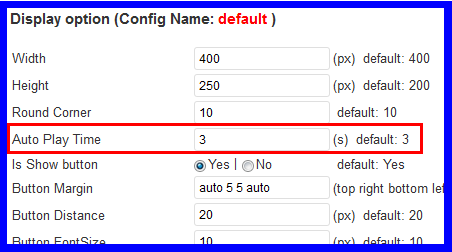
Auto Play Timemeans the change speed,http://file.xwjie.com/20111226234920.png
非常好用的插件

但是似乎只能插入9张图片,超过9张就无法点击了,请问有办法解决吗?
@cybasiter:
无法点击 ? 图片数量没做限制的,试过超过10张是可以工作的。图片数写你需要的数目,图片地址必须全部都不能空且不能有不能访问的图片地址就可以了。
@xwjie(风待):
请看我做的页面,
http://www.tmrcresearch.com/2011/12/zmet-campbells/#more-3403
图片数量设置了22张,文件都是处于同一个目录下,路径都相同,但是第 10 张以后就无法点击了。
@cybasiter:
你打开一下这个链接就知道什么回事了,404 Not Fount!
http://www.tmrcresearch.com//images/cases/campbells/10.png
这个插件必须保证所有图片地址中不能有不能访问的图片地址!!
风待你好。
http://www.preterio.com
这个是我的网站,现在遇到一个问题,
在后台预览,或放置到header.php中时显示都没有问题,
但放置到主题文件中,如intex.php中时就只有一片空白,
请问知道是什么原因吗?
谢谢。
风待你好。
上面的问题自己研究解决啦。
不过现在又有一个新的问题,后台预览不管Window Open设置为New还是Current点击图片都是可以打开的,但应用在主题中New的时候点击可以正常打开,Current的时候却没有反应,在几个浏览器中测试都是同样状况。
请问知道是什么原因吗?
谢谢。
@Chris:
这个问题是第一次遇见,方便给个选“Current”的flash所在的页面链接吗。
@xwjie(风待):
风待你好。
谢谢回复。
http://www.preterio.com首页的flash就是。
现在还有一个问题,已经上传至网页的flash在后台再修改image URL或link后无法反映到网页上……
@Chris:
修改后无法刷新一般是浏览器缓存造成的,可以尝试青春浏览器缓存试试。至于不能当前窗口打开的问题很遗憾暂时没有找到问题所在,在别的网站测试也没发现这问题。
@xwjie(风待):
谢谢,我再研究看看…
The plugin works great on the website but it will not work on mobile devices because it requires flash. Is there a way to have a placeholder image there instead just for users that do not have flash?
@MM:
Use plugin’s HTML code and some custom JS:
by default, the code look like:
<div id="wp_flash_img_show_here_eg5">wp_flash_img_show eg5 will display here </div>~~~~~~~~~
we modify it:
<div id="wp_flash_img_show_here_eg5"><img src="a_image_url.jpg" /></div>now it will show a image on some mobile phone which not suppot JS and Flash. but a lot of mobile equipment suppot JS, so we can use some Js to change the image, you will find a lot of js code, a sample: http://www.javascriptkit.com/howto/show2.shtml
你好!很高兴能够使用此插件!谢谢!
但是我遇到两个问题:
1、在网站首页点击幻灯片,根本无法打开在后台设置好的LINK页面,这是为什么呢?
2、此插件在IPAD上无法显示,有办法解决吗?
再次感谢!
@mybestvideo:
第一个问题也许是浏览器拦截了弹出窗口了
第二个问题是因为苹果设备都已经抛弃对Flash的支持了,所以无法播放,所以无法从根源上解决, 可以用基于JS的插件代替本插件
@xwjie(风待): THANKS
“如果发现后台有提示本插件有 “ Headers already sent… ” 这样的错误的话 ,你可以在插件管理页面编辑本插件的“wp-flash-img-show/wp-flash-img-show.php”文件,把最后的一个“?>”之后的换行符删除掉。”
我对这句话真的不太了解,看不大明白,因为我就出现了这个错误
@hengheng:
点下面的链接解压里面的php文件覆盖原来的试试看~
http://wp-flash-img-show.googlecode.com/files/wp-flash-img-show-v1.4-fix.zip
插件非常的棒,我很喜欢,一直在用着呢!过来支持一下!有更新记得一定要通知噢,呵呵!
博主您好,为什么我升级了wordpress之后,幻灯片就不能用了,看不到 后台也不能预览。网站首页也是空白的。 我是插入文本工具显示的
@创意吧:
3.3.1下测试没问题,请尝试在本插件的设置页面全部重新保存一遍应该就好了,不行的话麻烦告知WP版本和插件版本吧
“如果发现后台有提示本插件有 “ Headers already sent… ” 这样的错误的话 ,你可以在插件管理页面编辑本插件的“wp-flash-img-show/wp-flash-img-show.php”文件,把最后的一个“?>”之后的换行符删除掉。”
”点下面的链接解压里面的php文件覆盖原来的试试看~
http://wp-flash-img-show.googlecode.com/files/wp-flash-img-show-v1.4-fix.zip”还是无效
@sql:
你好,麻烦在出现提示的页面,在浏览器鼠标右击→查看源代码,然后把源代码保存发到这个邮箱 gdouxwj@gmail.com ,尽力帮你排除问题
你好,我填写了PHP代码(HTML的不行).页面上显示This movie requires Flash Player 9,谢谢!
@Danny:
在插件配置页面底部 勾选
启用“排错模式”,然后打开网站首页看看有没有提示@Danny:
不好意思,加了wp-head可以了.
博主那,这插件我用了两天好好的,第三天为什么不显示了,是不是我操作不当
@飞仔客博客:
是不是升级了WP版本或者换了主题?
可以试试在后台全部配置重新保存一次。
再不行的话可以勾选插件配置页面底部的
启用“排错模式”保存后,打开主页看弹出什么提示吧~My slideshow only shows 5 of 9 images… ¿why?
@Gerardo:
I guess the SIXTH image url is broken.
No, it is not…
@Gerardo:
You were right, the problem was in the sixth image.
Thanks.
WP version 3.3.1
WP flash img show version 1.4
用了。 在后台显示图片和文字都正常。
但是 前台显示不出来 前台显示的还是之前的。。 请问是什么原因呢。
@用了。 在后台显示图片和文字都正常。:
解决了。。
启用时出现Fatal error: Class ‘DOMDocument’ not found in /users/web2454917/wwwroot/wp-content/plugins/wp-flash-img-show/wp-flash-img-show.php on line 938 怎么的呢?
@www:
很抱歉,因为你的服务器不支持DOMDocument所以暂时无法使用这个插件。
也许以后,如果实在找不到其他可替代的插件的话请留言,我试着用别的办法使他可以工作。
Dear xwjie,
Thanks for an amazing plugin. I have installed it on my site, but there is an issue it appears sometimes only. When it doesnt appear, if you refresh the page it appears.
Thanks for your help in advance.
@Vaz:
I need more details about the issue, please COPY the Warning Reporting when it appear.
你好,WP version 3.3.1
WP flash img show version 1.4
设置都没有问题,排错模式也显示配置正确,可是就是不显示图片,预览也无法使用,请问为什么?
@zhang:
是不是图片不是放在当前的服务器上(外链)?只要有外链图片是会导致所有图片都无法显示的。
With the Adobe Flash 11.2 upgrade, my flash_ing_show will not display. This is the key part of our homepage. Please help!!!!!!!!!!!!!!
Ok, thanks. I’ve got it. I must clear my cache.
Thank you so much.
这个插件很适合我的站使用的,谢谢!!
Thanks for this amazing plugin. I have installed it on a website, ity works very well on line, but the gallery does not show on local installation (wamp)…any clue ?
Cheers from south France
@Florence:
Check every
Image URL(on wamp), replacehttp://www.---.com/with local URL (just likehttp://127.0.0.1/test/).I have installed this plugin on local, and it works perfectly. But, now I have installed it on a website, and it doesn’t see anything. The preview is missing as well.
This is the error occurs:
Warning: DOMDocument::save(…/wp-content/plugins/wp-flash-img-show/wp-flash-img-show-Reserva.xml) [domdocument.save]: failed to open stream: Permission denied in /public_html/wp-content/plugins/wp-flash-img-show/wp-flash-img-show.php on line 1019
I don’t know what to do. Can you help me?
@lapa:
login to the Folder Properties page of your web hosting file manager (or ftp tools),change the folder permission of
to writeable (755 or 777).
(see also http://codex.wordpress.org/Changing_File_Permissions)
@xwjie(风待):
Thank you very much!
@xwjie(风待):
I have changed the permission of all the archives to 755 and 777, and it hasn’t worked. The message of error is the same. What can i do?
@lapa:
Migration to a web server with PHP 5.3 did finally work, without having to make permission changes.
Thanks for the plugin. It’s great!!!!
你好,现在不支持外链图片,是否能够支持呢?
你好,非常感谢这个插件,做得非常不错!!!
现在不支持外链图片,是否能够支持呢?
@ambersky:
如果外链的哪个网站你是可以上传文件到根目录的话是有办法解决的(上传一个crossdomain.xml文件),但是引用的是公共相册上的图片的话大概是不行的,这是因为Flash的安全限制。
您好。
我的网站www.preterio.com/blog/现在遇到一个问题,就是在主页添加插件后,IE可以正常显示,其他的浏览器不行。因为在header里还有添加别的flash,所以我想可能是header的代码有问题,但是不知道该怎样改,可以指教一下吗?非常感谢!
您好,我想把代码发上去,但是好像发送不了……
@Chris:
如果是swfobject.js冲突的话,打开插件的PHP文件,用编辑器的查找功能查
swfobject.js,把这句加载JS的代码整句注释掉或者删掉。PS,发代码是 按两次 “code” 按钮,打字慢贴在那两个引号中间
@xwjie(风待):
谢谢风待!将header.php里的
<script type="text/javascript" src="<?php echo get_bloginfo('template_url') . '/' ?>swfobject.js"></script>删掉后,可以正常显示了。Thank you very much!
How to put this flash in the center of the page. Html codes dont work on it. it just remains on the left.
@Mate:
<div style="MARGIN:0 auto;TEXT-ALIGN: center;"> your code here :idea: </div>出错提示:
无法启用插件,因为它引起了一个致命错误(fatal error)。
Fatal error: Class ‘DOMDocument’ not found in /home/www/web/jytsoho.com_yFsHTwf1ZFsgNrlPiCTp/wwwroot/wp-content/plugins/wp-flash-img-show/wp-flash-img-show.php on line 938
请问该怎么解决呢?
@jytsoho:
非常遗憾,因为服务器不支持DOMDocument,无法使用该插件,如果你有服务器配置的权限可以安装该库来解决
谢谢兄弟做的好东西
发现 用chrome 和火狐 可以正常使用,用IE就出现 This movie requires Flash Player 9
@FF:
请问用那台电脑的IE浏览器可以正常显示这里的FLASH吗? http://xwjie.com/demo/wp-flash-img-show-demo.php 如果不能,可能是Flash版本过低。
能正常显示的话那应该是swfobject.js冲突导致,请在浏览器查看那个页面的源代码,查找
swfobject看是不是能找到两处?是的话修改本插件删除swfobject.js的代码吧。多谢作者,插件简单易用,希望多开发点过度模式哈。。。
@uhoo:
其实插件的Flash部分是由bcastr项目所维护 http://code.google.com/p/bcastr/ 遗憾的是作者暂时没有余力来支持bcastr项目。
非常不错的插件,但装好后发现一个问题。默认显示4张图片,我改成10张,地址什么的都填好,按钮变成10了,就是只显示4张,后面的都不显示。不知道怎么回事。请教一下。
@roweet:
5~10的图片地址不对,只要第五张地址无效就没法显示5~10的。注意不能用外链图片。
@xwjie(风待):
非常感谢,问题解决了。但是发现在360和IE浏览器上,网站或网站后台有时显示图片有时显示不出来。在谷歌浏览器上一切正常没出现过这个问题。是什么原因呢?
@roweet:
是不是缓存问题?或者是IE核心的Flash版本。
作者你好,关于你的插件。
WP flash img show,我在本地上测试没有任何问题,但是一但传到主机上就没有任何效果了,显示空白。
希望你能帮助我,是不是我的主机上不支持哪些你插件上的函数?麻烦了,请尽快回复!
作者抱歉,打扰你了。我把图片获取方式:
手动输入图片URL地址、链接、描述 (默认)
自动从最新文章获取图片
来回切换几次,就出现图片了,折腾了我好久!@小清博客:
@小清博客:
检查图片地址不要有中文,第一张图片地址不正确将导致空白。
请问一下,能给推荐个可以支持外链图片地址的此类插件吗?
@fscdragon:
请到官方插件库搜索 slide show
另外本插件也是可以跨域的,前提是你要在图片服务器域名的根目录下放置一个crossdomain.xml文件:
http://code.google.com/p/wp-flash-img-show/downloads/detail?name=crossdomain-xml.zip
i installed this plugin in my own website and its a great..but when we share our page on any social network like facebook then msg display with page -wp_flash_img_show will display here (config: getncr)..how i resolve this
@ahtisham:
This is the first time I’ve encountered this issue, Do you mind provide a URL of your page?
http://www.getncr.com/it-companies/
想问一下,我的选项是”Get images from this page automatic”,并选择了Gallery那个页面,但图片出不来,依然是插件自带的四张默认图片。想问一下是我遗漏了什么选项吗?我是前几天才刚接触WP的新人,抱歉打扰您啦><
I made a translation into Slovak
https://dl.dropbox.com/u/33612458/PLGS/1/wp-flash-img-show_sk.zip
我再我本地使用这个插件可以实现功能,但是我放到服务器上就不能运行了,我的设置和最终显示的效果不同!找了好多原因都不行,我的服务器是linux系统,从服务器上删除再重新上传,不知道有缓存还是别的,总是显示删除前的信息
@郑强:
把插件文件夹权限设为可写即可
老大真心佩服你。
不过我在本地测试为什么插件后台是英文的,在服务器上确是中文的呢。
还有就是,现在都是手机,ipad上网,而这个flash却是他们不支持的,实在是咬牙。这有什么好的解决方案吗?(不会告诉我,ipad越狱什么的吧)
期待回复
谢谢
@青刀刀:
英文是因为WP的语言没有设为简体中文。
ipad不支持FLASH也没办法,要不用JS+CSS的幻灯片插件吧。或者写个JS判断在不支持FLASH的设备自动同JS幻灯片替代原位置。
非常不错的插件,已经用上了,很漂亮,谢谢博主的分享,看看我的效果http://www.zhjfa.com
This is a fantastic pluggin. Thanks a lot.
我的网站 首页幻灯片有点小问题,那就是 谷歌IE9 都能显示 幻灯片 ,火狐却不能显示,还有360也不显示,不知道是什么原因。。。。您能帮我看一下吗 是什么原因 很喜欢这个查件 正好满足我的要求!再次感谢一下作者!
@潇湘公子:
你好,请把每张图片改为英文名再重新上传即可。
例如下面这张有中文名的图会造成兼容性问题。
http://www.youmeiwenzi.tk/wp-content/uploads/黄色花.jpg
@xwjie(风待):
原来如此。多谢了!!!感谢!!!!
完美解决 特来拜谢!十分感谢! 节日快乐!
节日快乐!
请问下怎么才能只获取某分类的图片呢?
@hello:
你好,暂时无该功能,有PHP基础可以修改插件的get_img_from_post函数实现
我的设置成功了,但是显示的位置是左对齐显示的,我想让它像文字一样能缩进部分像素,也就是空白几个像素再显示,请问在CSS里面怎样调用呢?
@默然:
HTML加入:
<div id="wp_flash_img_show_sty">幻灯片代码</div>然后 CSS 加入
#wp_flash_img_show_sty { padding-left: 20px; }@xwjie(风待):
感谢!我的问题解决了,太谢谢了!
我想把中的transparent改成Opaque,怎么改呢?
你好,请问
<param name="wmode" value="Transparent">怎么使value值变成Opaque?@blue ice:
因为没有单独的选项,请打开插件文件夹下面的
wp-flash-img-show.php文件,替换3处Transparent为Opaque我想让别的层显示在flash之上,网上有的说wmode设置为transparent,有的说设置成opaque,我两个都试过了,可是还是不能实现,您知道怎么让别的层显示在这个幻灯片之上吗?谢谢
@blue ice:
在“别的层”的CSS属性加入
z-index:5000;试试看how do you center the slide show in a post? I cant get it to work
@angela:
<div style="text-align: center;">Original Code: <div id="wp_flash_img_show_here">wp_flash_img_show will diaplay here</div>
</div>
I m already try the to put html code for mobile that you suggest in comment box but It’ doesnt work for my web site. Would you like to inform to me step by step so I’m clear. Thank’s
你好,为什么老是会出现“this movie requires flash player 9”,还有,我的图片是放在又拍网上的,不是直接上传到本地,有影响么?谢谢
@ming:
必须上传到本地,其次请在插件设置页面的底部打开“排错模式”按提示看看有没其他问题。
我的插件第一次装正常 第二次装然后又重装一遍程序装 那个预览和首页空白啊 解决不鸟。。。如果有解决方案可以发邮箱 谢谢
Hallo, this is the first I use WP CMS. then I found this plugin. My question? How to upload our file jpg, pdf etc in order to it can be shown wp_flash_img_show? Thank you
您好:我安装、启用后,怎么没有设置框
您好:上面的问题解决了,有预览,但在网页上不显示,请问:怎么解决
@随风而去:
在后台勾选“排错模式”(侦错模式),然后打开主页刷新看看有没有提示。
thank’s for this plugin, so nice
这个插件在启用工程产生了389个字符的异常输出
要是jquery的插件就好了,不喜欢flash
你好,为什么更新了WordPress程序以后WP flash img show 插件的图片不显示了?保存的路径也是对的,预览的地方是一片空白。希望帮助一下,谢谢。
作者你好,我在电脑端运行没问题,但是在手机端的首页没有显示图片而是:
wp_flash_img_show will display here(config:default),是本身就不兼容吗还是?
谢谢!
@dongdao:
要使插件正常运行确保你的主题模板文件中有一个 wp_head() 在 之前, 而且有一个 wp_footer() 在 标签之前, 否则很多插件无法使用,包括本插件(请手动添加到主题模板文件中).
http://codex.wordpress.org/Function_Reference/wp_head
http://codex.wordpress.org/Function_Reference/wp_footer
请问一下博主这个插件可以实现响应式吗?
我用的是百度编辑器 然后首页幻灯片只会显示编辑器rar的图片 不会显示其他图片 希望告诉修复办法。我的博客地址 blog.suiyuan68.cn